
You’re preparing for investor diligence, a small acquisition, or a partner review, and you need a secure place to share confidential data. A free data room, whether a free plan or a free trial, can look like the easiest option.
This guide compares the top free VDR providers, explains their pros and cons, and helps you decide when a free option is enough and when a paid plan of one of the best virtual data rooms in the UK is worth considering.
What Is a Free VDR Provider?
A virtual data room (VDR) is a secure online repository where businesses store, organize, and share confidential documents with selected users.
The term “free VDR provider” usually refers to a VDR provider that offers one of two options: a free trial with temporary access to paid software, or a forever-free plan that may include limited storage, users, or security features.
Why Small Businesses Consider Free VDR Providers
Small businesses often review every new subscription carefully. Many UK SMEs now rely on 10 to 20 software tools across marketing, sales, and operations, making software one of the fastest-growing items in operational budgets.
Another paid platform can feel hard to justify when the team only needs it for a specific project, such as seed or Series A fundraising, supplier due diligence, early M&A discussions, or IP and legal document sharing.
That is why many teams compare virtual data rooms with free plans or explore paid data rooms for startups.
Top Free VDR Providers: Pros and Cons
We’ve picked the best virtual data rooms that offer either a free plan or a generous free trial. With free trials, you will usually need to pay eventually, often after the project goes live. Still, these trials can help you upload sensitive documents, create groups, set permissions, and prepare the data room before billing starts.
Ideals VDR | Free plan: 250+ GB, 7-day free trial

Ideals VDR offers a fully functional 7-day free trial with 250+ GB of storage. This gives teams enough room to upload documents, create user groups, set permissions, and prepare an M&A data room in a general sense before going live.
Fully functional access means users can convert directly to a paid subscription. This is much better than typical restricted trials that force users to reconfigure essential settings when going live.
Pros:
- Fully functional trial, not a restricted demo
- No payment info required
- No billing for sell-side M&A projects until the data room goes live
Cons:
- No forever-free plan for long-term use
- A paid subscription is required if the project launches
Best for: M&A project preparation, especially for sell-side M&A teams that seek an unlimited preparation period.
Box | Free plan: 10 GB — forever free for individuals, 14-day free trial for business

Box is a strong cloud content platform. It has a forever-free plan built for individual file storage and basic collaboration, with 10 GB of storage, a 250 MB upload limit, one file version, and five Box Sign requests per month.
That may work for early document collection, but it can quickly become limiting once a deal needs larger uploads, version history, external reviewers, or robust data security. For that, Box’s business plans are more relevant. They include 14-day, fully functional free trials.
Pros:
- Forever-free individual plan for basic document sharing
- 14-day trials for business and enterprise plans
- Strong integrations with Microsoft 365 and Google Workspace
Cons:
- 250 MB upload limit and one file version on a free plan are restrictive
- The platform, in general, is not a purpose-built VDR
Best for: Small teams that want to organize documents in a familiar cloud platform before deciding whether a business-grade Box plan is enough for their project.
ShareFile | Free plan: 1 GB per user, 7-day VDR trial
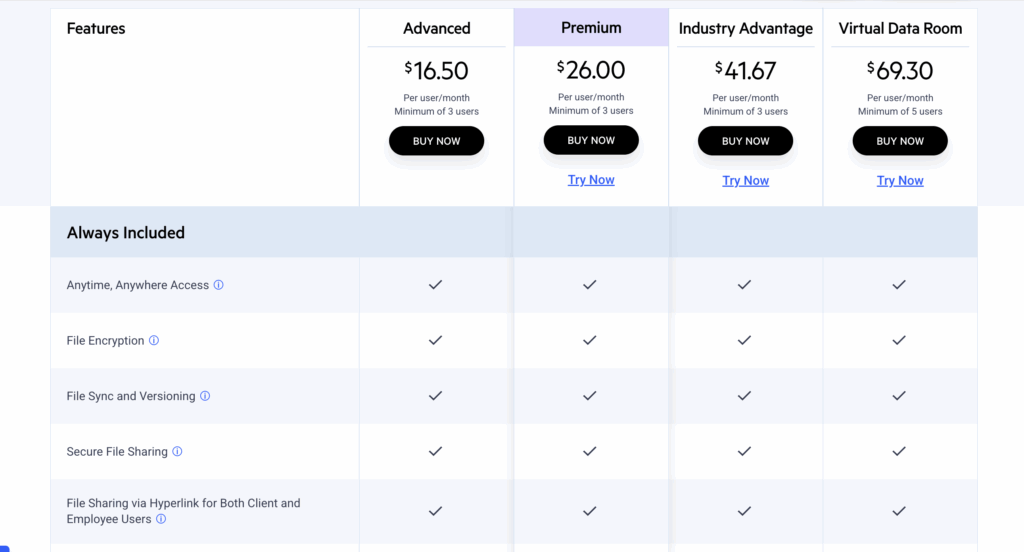
ShareFile is best understood as a secure collaboration platform with a separate data room-grade option. While this plan includes VDR-specific controls, some broader workflow features available on other plans, such as automated workflows, don’t appear to be included. For teams that want both data room controls and repeatable document automation, that separation may create an awkward trade-off.
Trial terms also vary by plan: the Virtual Data Room plan offers a 7-day free trial; Premium and Industry Advantage offer 30-day trials; and Advanced doesn’t appear to include a free trial.
Pros:
- No card details required to start the VDR trial
- Predictable user-based pricing
Cons:
- Not all plans have a free trial
- The duration of free trials is inconsistent
- Data room-grade capabilities are tied to the most expensive plan
Best for: Teams that need to test ShareFile’s dedicated VDR when choosing among data room options.
Datasite | Free plan: 90-day Prepare trial

Datasite offers one of the longest free trial periods in this category: a 90-day Datasite Prepare trial. Datasite Prepare is built for M&A preparation, allowing teams to structure files, build an index, manage checklists, and later convert to a live Datasite Diligence project without re-uploading or rebuilding the room.
The trade-off is that Datasite separates its platform into deal-stage products, such as Prepare, Diligence, Acquire, Outreach, or Archive, which can make the product structure harder to understand.
Pros:
- 90-day trial, which is longer than most VDR trials
- Strong fit for sell-side M&A preparation
Cons:
- Trial appears focused on Datasite Prepare, not the full live VDR workflow
- Product structure may feel complex
- Pricing can be difficult to predict once the project is converted to a live VDR. Datasite may charge by page count and data volume
Best for: Sell-side teams that need a long preparation window before moving into a live due diligence project.
Ansarada | Free plan: 250 MB–20 GB, freemium subscription
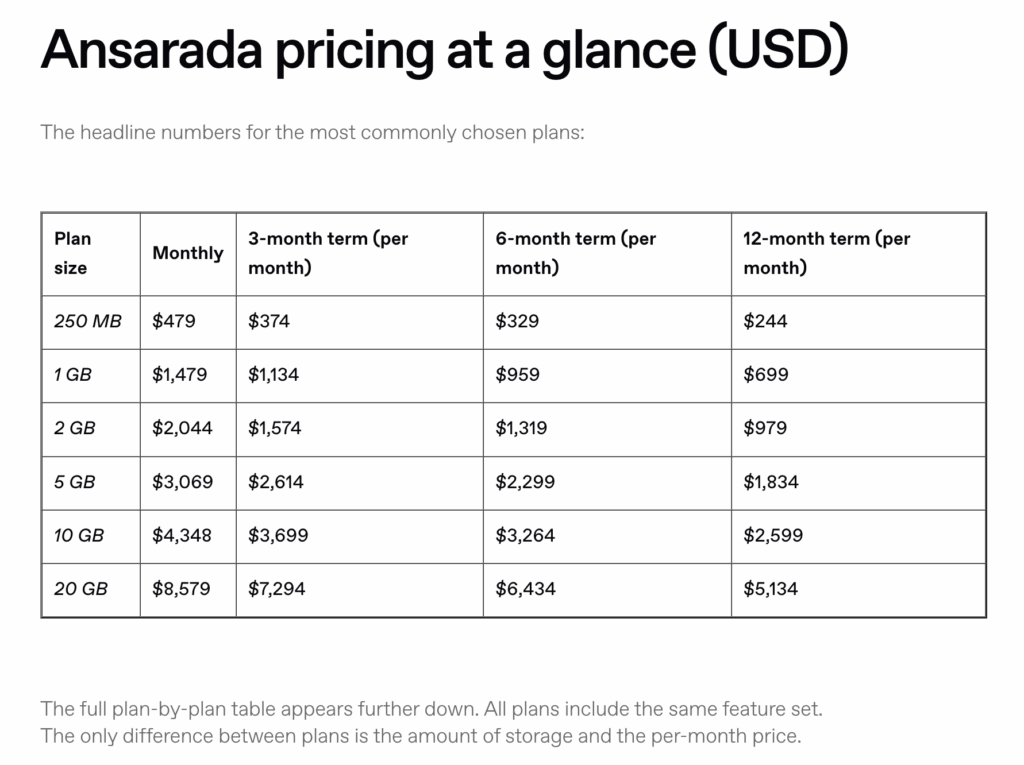
Ansarada offers a “freemium” preparation model. Teams can create a data room, upload documents, structure the project, and keep it in the trial stage for as long as needed. Storage capacity ranges from 250 MB to 20 GB and can be selected during registration. Billing starts when the room goes live.
Pros:
- Good fit for sell-side preparation
- Can convert to a live deal directly, like with Ideals and Datasite
- No billing until the project goes live
Cons:
- Subscription is expensive for small businesses
- Users can’t downsize or upsize storage at the free stage
Best for: Sell-side teams that need to prepare a data room before inviting bidders, investors, or other external guests.
DocSend | Free Plan: 50 GB per user, 14-day free trial
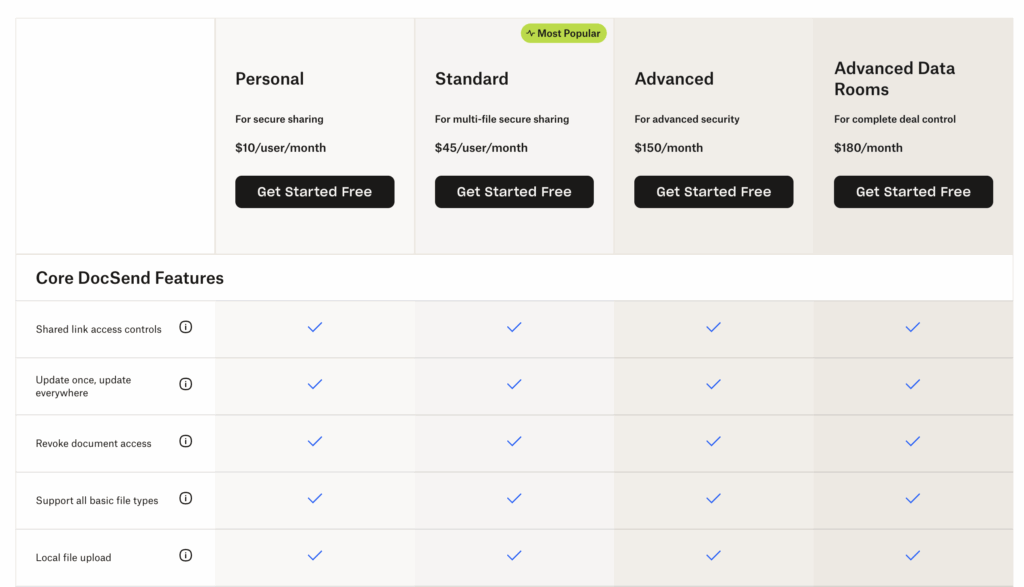
Dropbox DocSend has a dedicated Advanced Data Rooms plan, which is the closest option to a VDR in its product lineup. The Advanced Data Rooms plan includes 50 GB of storage per user, carries over the features available in lower-tier plans, and adds deal-focused capabilities.
The 14-day trial is consistent across plans, and the trial terms are clear: users receive a reminder before the trial ends and are not charged unless they choose to upgrade.
The caveat is that DocSend is still more of a lightweight confidential-sharing platform than a dedicated deal platform such as Ideals, Datasite, or Ansarada.
Pros:
- Clear 14-day trial with no automatic charge unless users upgrade
- Consistent trial duration across plans
Cons:
- Not a fully dedicated deal platform
- Better suited to lighter fundraising and document-sharing workflows than complex M&A
Best for: Startups and small teams that need a lightweight data room with strong tracking and simple access controls.
Papermark | Free plan: Self-hosted or 7-day data doom trial
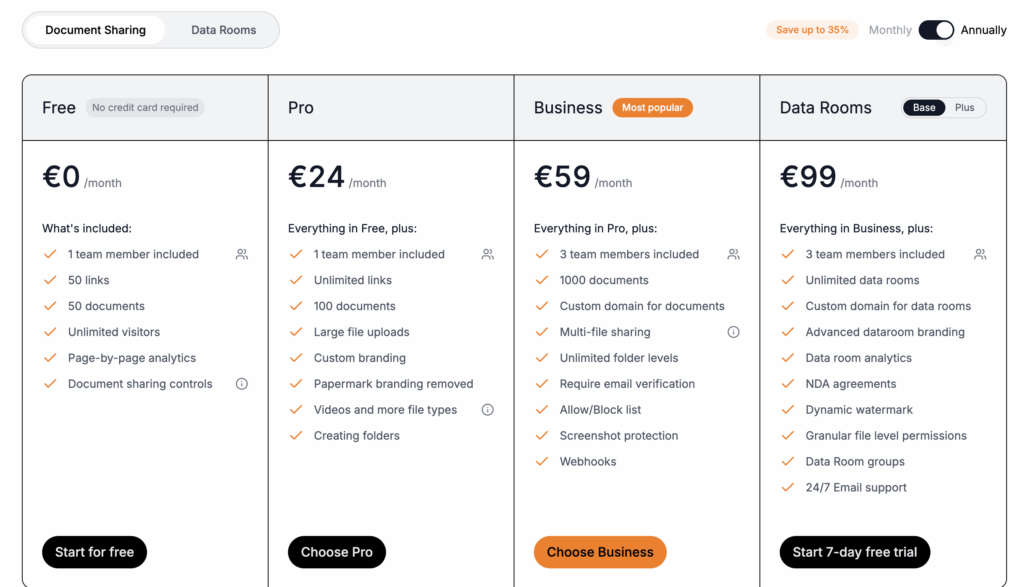
Papermark has two different routes: a hosted SaaS product and an open-source version that technical teams can deploy themselves. The open-source version gives access to the code, but it’s not a ready-to-use VDR.
Papermark’s hosted SaaS version has a forever-free individual plan for light document sharing. It also advertises a 7-day free trial for data room plans, but the trial appears to route users to the limited free plan. Overall, Papermark is closer to a lightweight DocSend alternative than a dedicated M&A-grade deal platform.
Pros:
- Open-source option for teams with technical resources
- Forever-free SaaS plan with no credit card required
Cons:
- The free SaaS plan is very limited in functionality
- The open-source version requires technical setup and secure infrastructure
- Data room trial does not appear to unlock a full paid-tier environment
Best for: Technical teams and early-stage companies that want a more controlled document-sharing option than a basic cloud drive, but don’t need a full deal management platform.
Free VDR Providers Compared
Our virtual data room comparison highlights free plans and free trials offered by VDR providers and secure document-sharing platforms for small businesses to consider.
| Provider | True free plan | Free trial | Storage | What’s special |
| Ideals | No | 7 days/unlimited for sell-side | 250+ GB | Fully functional trial. Teams can convert to a paid subscription without rebuilding the project. Billing for the sell-side starts when the project goes live. |
| Box | Yes | 14 days | 10 GB–unlimited | The free plan is for individual storage and general sharing. |
| ShareFile | No | 7–30 days | 1 GB per user | Trial duration varies by plan, and some workflow features appear unavailable on the VDR plan. |
| Datasite | No | 90 days | Not clear | Functionality appears split across deal-cycle products. |
| Ansarada | No | Indefinite | 250 MB–20 GB | Teams can prepare a data room before inviting guests. Billing starts when the project goes live. |
| DocSend | No | 14 days | 50 GB per user on Advanced Data Rooms | Users are not charged unless they choose to upgrade. The Advanced Data Rooms plan includes lower-tier features plus VDR-specific tools. |
| Papermark | Yes | 7 days | 50 documents on the free plan | Open-source document-sharing platform. The free plan is useful for light sharing. Data room trials appear to route users to the limited free plan. |
Limitations of Free VDR Providers
Free VDR plans are typically not designed for deal work. Here’s why:
- Limited storage (1–10 GB) may not be enough for extensive business processes
- Free tiers rarely include granular access controls for varying deal teams — bidders, advisors, investors. And most free plans lack Digital Rights Management (DRM), screenshot capture blocking, detailed audit trails, or other essential, VDR-grade document security controls
- If something breaks during a live deal, limited support can slow the process
- White-labeling and custom domains are usually paid features
Open-source virtual data rooms solutions are not a simple workaround either. They may eliminate licensing costs, but self-hosted software still requires infrastructure for data protection, setup, maintenance, monitoring, security patching to prevent data breaches, and compliance work. Self-hosted infrastructure alone can cost $2,000–$5,000 per month before hidden engineering time is factored in.
For financial transactions, the most secure, workable virtual data room software comes with paid plans – and they’re cheaper than self-hosted tooling. For a clearer view of the cost difference between paid tools, see how virtual data room pricing compares.
What Paid VDR Providers Offer That Free Options Don’t
The biggest difference between free and paid plans is security, support, and accountability during live transactions.
Paid data room services typically include:
- Granular permissions with 5–9 access levels for users, groups, folders, and documents, crucial for the due diligence process
- Advanced security features, such as DRM, IP restrictions, dynamic watermarking, and secure sharing links
- Dedicated project managers for setup and deal support
- 24/7 customer support with faster response times
- Compliance and operational resilience through certifications, encryption, data residency options, backups, and disaster recovery protections
Bottom line
Free virtual data room providers are better understood as free VDR plans. They are useful for testing a platform, collecting early documents, or preparing a sell-side project before launch.
Once a deal goes live, paid VDR plans are usually the only practical option for secure dealmaking.
Compare modern virtual data rooms through the datarooms.org.uk VDR comparison tool and choose a solution that fits your deal stage, risk level, and expected growth.
FAQ
Are free VDR providers safe enough for due diligence?
Purpose-built datarooms often include data encryption and audit trails even during free access, which is safer than generic cloud storage. However, a paid subscription is generally the best choice for secure file sharing in complex transactions.
What are the best free VDR providers for small businesses?
Ideals’ free trial is the strongest option for deal preparation, especially for sell-side M&A teams. Box and Papermark’s free tiers are better suited to general file sharing.
Is there a truly free, secure virtual data room?
Yes, Papermark has a self-hosted open-source dataroom option, and some platforms offer forever-free tiers. However, fully featured, permanently free SaaS solutions with enterprise-grade security are practically nonexistent in the virtual data room market.
Can I use Google Drive instead of a free VDR?
Google Drive may work for informal file sharing, but it’s not suitable for working with sensitive data. Free virtual data room services can also be limited in functionality, so a paid VDR plan is usually the better option for secure data storage in mergers and acquisitions and fundraising.