
Orangedox Data Room Review
If you’re evaluating secure data rooms for an upcoming deal just for secure document sharing, you’ve likely come across Orangedox. It positions itself as a straightforward, document-centric platform built around Google Drive. And the last point immediately sets it apart from the more enterprise-heavy options on the market.
This Orangedox review takes a close look at what this provider offers:
- Key features
- How it handles security
- Pricing details
- Use cases
The goal of this overview is to give you a clear picture so you can make the right call for your team and your deal.
What is Orangedox?
Orangedox is a document management and secure file-sharing platform built on top of Google Drive. It is often described as a lightweight virtual data room solution.
The core idea of this tool is simple: many organisations already use Google Workspace. Orangedox extends its capabilities with:
- Controlled document sharing.
- Detailed tracking and analytics.
- Custom branding.
- Permission-based access.
- Watermarking and download restrictions.
Orangedox virtual data room is typically used by:
- Corporate finance teams.
- Fundraising startups.
- Legal professionals.
- Real estate firms.
- Investment advisors.
Its market positioning sits somewhere between simple file-sharing tools and more complex, enterprise-grade VDR platforms.
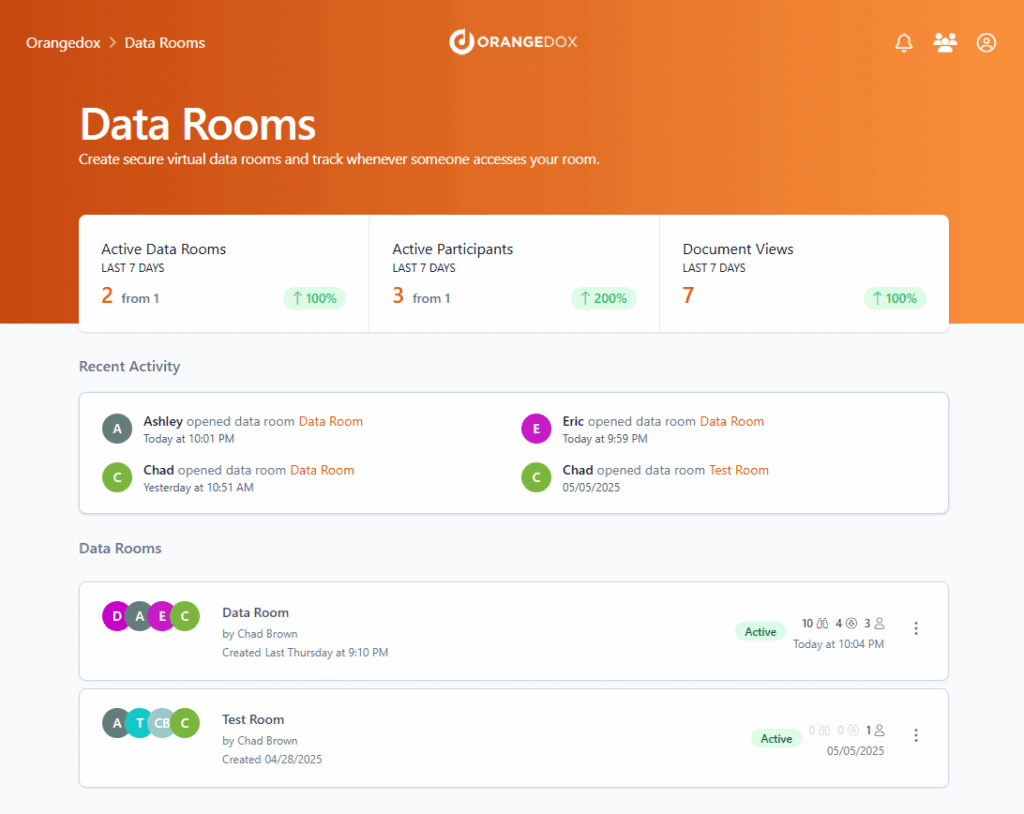
Typical Orangedox use cases
Here are the most common scenarios where Orangedox VDR is used:
M&A transactions
Buyers need access to financial statements, contracts, compliance records, and operational documents. Orangedox lets sellers share this information while keeping a close eye on who views what and when.
Legal due diligence
Law firms need clear audit trails and controlled access during due diligence. Orangedox handles tracking of legal documents and permission management, and doesn’t require a completely separate infrastructure to be set up.
Private equity and fundraising
From early-stage startup data rooms to established investment firms, teams regularly share pitch decks, cap tables, and financial forecasts. The platform’s analytics make it easy to see which investors are actually engaging with the materials.
Corporate finance projects
When advisors are coordinating between multiple stakeholders, they need a clear structure. Orangedox supports folder-level access controls and branded client portals to keep things organised.
Cross-border document sharing
In international transactions, security and GDPR compliance come into focus. Orangedox adds tracking and access control on top of existing cloud storage, which can simplify the compliance side of cross-border deals.
Key features
The core features Orangedox offers include:
| Feature | What it does | Why it matters |
|---|---|---|
| Permission management | Controls who can view, download, or print documents | Reduces risk of data leaks |
| Document tracking | Shows who opened files and for how long | Helps assess buyer or investor interest |
| Watermarking | Adds viewer-specific watermarks | Deters unauthorised sharing |
| Audit logs | Records activity across files | Supports compliance and legal review |
| Custom branding | Branded portals and emails | Professional presentation for clients |
| Download restrictions | Limits file exports | Protects sensitive materials |
| Google Drive integration | Works directly with existing folders and Google Docs | Avoids duplication and migration |
Security and compliance
Security is central to any virtual data room. Orangedox relies heavily on the infrastructure of Google Drive while adding its own access controls for secure document management.
Key security elements include:
- Encryption in transit and at rest (via Google infrastructure).
- Granular access permissions.
- Watermarking and document-level restrictions.
- Detailed audit trails.
From a compliance perspective, organisations operating in the UK and EU need to consider GDPR. Since Orangedox is built on Google Workspace, data protection standards depend in part on the underlying Google environment.
For regulated sectors, teams should confirm:
- Where data is hosted.
- How access logs are stored.
- Retention policies.
- Internal compliance procedures.
Overall, Orangedox aligns with widely accepted cloud security standards, but companies that handle highly sensitive data may require additional internal controls.
Ease of use and setup
One of the main advantages of the Orangedox VDR is its setup speed.
Because it integrates with Google Drive, there is no need to re-upload documents into a separate system. Teams can:
- Organise files in Google Drive.
- Connect Orangedox.
- Apply permissions.
- Share secure links.
The interface is generally clean and straightforward. For teams already familiar with Google Workspace, the learning curve is relatively low.
Orangedox pricing structure
Orangedox pricing is subscription-based. There are three plans available:
| Plan | Price (USD / month, billed yearly) | Best for | Key inclusions |
|---|---|---|---|
| Starter | $55 | Solo early-stage founders raising a seed round | 1 admin • 5 data rooms • Dynamic watermarking • NDA gating & signing • Custom branding • Bulk downloading • Onboarding support |
| Business | $65 | Companies preparing for their next funding round | 2 admins • Unlimited data rooms • Dynamic watermarking • NDA gating & signing • Custom branding • Bulk downloading • Onboarding support |
| Teams | $135 | Venture firms and investment teams | 5 admins • Team management tools • Unlimited data rooms • Dynamic watermarking • NDA gating & signing • Custom branding • Bulk downloading • Onboarding support |
Compared to traditional virtual data room providers that charge per project or per gigabyte, Orangedox pricing can feel simpler and more predictable. Plus, they offer a 14-day free trial so that potential users can explore the platform before making a long-term commitment.
Customer support and service quality
Customer support is an important factor during live deals. Based on publicly available feedback and general user reviews, Orangedox offers:
- Email-based support.
- Help centre documentation.
- Onboarding guidance.
There is no dedicated account manager on lower-tier plans, which is standard for platforms in this price range.
Other, more advanced data room platforms often provide round-the-clock support and dedicated customer success managers, which is crucial for cross-border deals. Orangedox’s support model is less suited to high-pressure situations, where immediate response is needed.
If your work regularly involves time-sensitive transactions where technical issues could have real consequences, it’s worth considering this factor.
Pros and cons
Here are Orangedox’s strengths and limitations to take into account when exploring this data room provider:
Key advantages
- Seamless Google Drive integration.
- Simple setup process and intuitive interface.
- Clear document tracking analytics.
- Transparent subscription pricing.
- Useful for small teams fundraising and mid-sized projects.
Potential drawbacks
- Not a fully standalone enterprise VDR.
- May lack advanced deal workflow tools.
- Security depends partly on the Google Workspace setup.
- Less tailored for highly regulated sectors and big deals.
For many teams, the simplicity is a benefit. For others, requiring enterprise-grade security, it may feel like a limitation.
Orangedox compared to other virtual data rooms
Here’s how Orangedox compares to other popular virtual data room providers. This comparison focuses on features, pricing model, usability, and the typical organisations they suit best:
| Provider | Pricing model | Core strengths | Usability | Best for |
|---|---|---|---|---|
| Orangedox | Flat monthly subscription ($55–$135/mo, billed yearly) | Seamless integration with Google DriveEasy setupDocument tracking & watermarking | Simple and familiar for Google Workspace users | Startups • Mid-sized businesses • Smaller due diligence & fundraising projects |
| Ideals | Subscription (mid-market tier) | Strong securityAdvanced document control & granular permissions | User-friendly with deep VDR features | Mid-market and enterprise M&A and due diligence |
| Datasite | Enterprise pricing (typically per-deal) | Rich analytics, workflows, and compliance tools | Designed for complex, large-scale deals | Large M&A transactions and investment banking teams |
| Firmex | Flexible (subscription or per-use) | Robust security and flexible pricingUnlimited rooms option | Solid balance of features and user experience | Professionals handling sensitive documents at scale |
| DocSend | Subscription (user-based) | Simple document sharing with tracking | Very easy to use, but not a full VDR | Early-stage fundraising and basic secure sharing |
| Ansarada | Enterprise tier | AI-powered workflows & deal intelligence | Higher-end VDR features with structured process tools | M&A and complex deal teams needing workflow support |
Who Orangedox is best for
Orangedox data room is typically best suited for:
- Mid-sized companies.
- Startups raising capital.
- Corporate finance teams.
- Legal teams managing smaller due diligence processes.
- Real estate firms sharing confidential project documents.
It is less likely to suit:
- Large cross-border M&A transactions with multiple bidders.
- Highly regulated financial institutions requiring extensive compliance controls.
- Complex public market deals.
One important note is that the fit also depends on transaction complexity rather than company size alone.
Final verdict
Orangedox is a practical, no-frills virtual data room that does what it promises — secure, trackable document sharing built on top of Google Drive. For teams already in the Google Workspace ecosystem, it’s one of the quickest and most affordable ways to get a data room up and running.
If you’re doing fundraising or mid-sized deals, it’s a pretty cost-effective option for organized document sharing.
But for major M&A deals involving multiple parties and compliance requirements, you’ll likely want to consider Orangedox alternatives.
Frequently asked questions
Is Orangedox a full virtual data room?
It functions as a lightweight virtual data room built on Google Drive. It adds tracking and security controls, but is not a standalone enterprise VDR.
Is the Orangedox data room GDPR compliant?
Compliance depends partly on your Google Workspace setup. Orangedox aligns with standard cloud security practices, but companies should confirm their internal data handling policies.
What is Orangedox typically used for?
Common use cases include fundraising, legal due diligence, M&A preparation, and sharing documents with potential investors or clients.
How long does it take to set up?
For teams that already use Google Drive, setup can be relatively quick. Most teams can have a working Orangedox data room ready within a few hours.